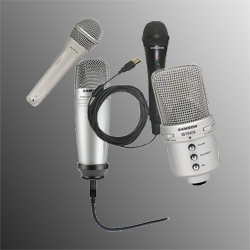
USB microphones have seen significant improvement in quality and price in recent years. High-quality audio recording is much more convenient and affordable with these plug-and-play mics than using a standard microphone, and they’re definitely cheaper than some of the extra equipment that you would need with a standard mic. If you’re anything like me, not adding to the list of “gadgets that give me a headache” is always a good thing.
Less To Do
Most standard microphones require the user to install software on their computer so that the computer knows how to use it. It’s not a huge hassle, but finding that disc when you need it months or years down the road might be. A key advantage of USB microphones is that they do not require you to install anything on your computer in order to use them. Some will come with software that you can use, but it is not absolutely required to use it. Whether you’re changing between two computers at your own home or doing some recording at a friend’s house, setting up your mic can be as simple as plugging it in.
No Interface Box Required
Another difference between these two types of mics is that a USB mic will always be used to provide digital input to a computer. Because of this, the mic makes the analog-to-digital conversion within the microphone itself. With a standard mic a separate interface box with an analog-to-digital converter, or ADC, in it is used. A decent quality ADC can cost more than $100, so having the converter included in the mic is great. The ADC takes analog signals, which are the kind of signals that humans can make and understand, and turns them into digital signals, which computers can understand. When it’s time for playback the digital information is turned back into analog sound by speakers for our ears to enjoy.
With all these great perks about USB mics, why would anyone use anything different? Compared to a USB mic, standard microphones of the same type are generally less noisy, producing better quality recordings that are more clear with less hiss. Depending on what your home recordings are being used for, upgrading to a standard microphone may or may not be necessary in the long run. Plus with some decent quality noise-reduction tools available in most recording software, this may not be a huge problem.
Instead of letting the cost and complication of new equipment keep you from getting started, try a more reasonable combination of an affordable mic and the right know-how to get the most for your time and money.
After “What is a USB microphone?”, the next logical question is where to start? The Samson Q1U is a great value, with the Samson C01 being a step up from there. Either of these mics are available at places like Best Buy or online for about $50 and $80 respectively. There are better, more expensive mics available, but either of these two will start you on the path towards professional recording from home. Instead of letting the cost and complication of new equipment keep you from getting started, try a more reasonable combination of an affordable mic and the right know-how to get the most for your time and money.
 “Home recording for non-engineers” is just my way of saying that it does not have to be hard or expensive for just about anyone to do it.
 Sampling frequency in audio recording can perhaps best be described by first taking a look at your favorite Hollywood movie. Even though life happens continuously, movies show us fast chains of still images that our brains interpret as continuous movement. Usually the rate is around 24 frames per second. Sound is also continuous, but it takes a lot more than 24 “frames” of sound per second to sound decent. Although a film camera is taking pictures of people and real objects, audio equipment is taking “pictures” of sound waves. These pictures are called samples, and the most common rate is 44,100 sound samples per second, or 44.1 kHz.
 To mix music down means to combine several tracks of audio into a single file when doing multi-track recording. The term “render” means the same thing. It’s actually more often used these days in many audio software programs.
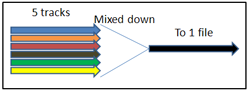 is combines the output of all your tracks, at their current volume relative to the other tracks, into one audio output. It’s like putting lots of things (like 5 audio files) into a funnel, and having only thing (wav or mp3 file) that is a mixture of the 5 sources come out the small end. See the picture on the right, which pretty much sums up (no pun intended…OK, pun intended) mixing down.
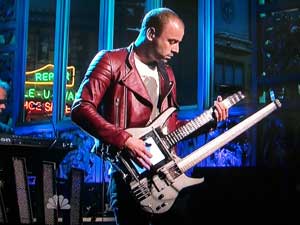 Updating this post because I’m watching Late Night With Stephen Colbert on July 20th, 2017. Chris was still playing the same instrument I wrote about back in 2012. Here is what I wrote about it back then.