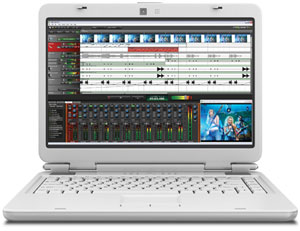
Someone asked me this morning if I could talk a bit about Mixcraft recording software (technically a DAW – digital audio workstation) by Acoustica. Since I am always going on about Reaper (my favorite DAW – digital audio workstation), which is my go-to recording program, he wanted to know if I could sort of compare and contrast the two.
Recording Magazine has a blurb in the FASTFORWARD section of the September 2012 issue telling us that Acoustica has shipped the new version of Mixcraft – Mixcraft 6 and Mixcraft Pro Studio 6. Like Reaper, Mixcraft 6 is in that category of affordable audio software that delivers professional recording capability. Both would be terrific for any home recording studio. In looking at the description of Mixcraft features, I didn’t see any that Reaper didn’t have except for the loop library you get with Mixcraft with 6,000 loops. If you plan on using loops a lot, this might be a tick in the Mixcraft column.
The two versions of Mixcraft are priced at $75 and $150, respectively. Some of the things they heralded as new features are things Reaper has done from the start, like support for VST instruments (Lesson 11 in our new Reaper course, BTW;)), EQ effect, multi-band compressor, loop recording with multiple takes, and automated punch in/out.
The Mixcraft Pro Studio 6 version adds what Recording Magazine describes as “16 high-quality effects plug-ins” (they didn’t say what those were), and 3 virtual instruments (including the Pianissimo grand piano), as well as the very cool iZotope Mastering Essentials and 3 Mid-Side processing tools, tape emulation and 2 parametric EQs. I’m familiar with iZotope through their Ozone mastering suite and their T-Pain Effect Plugin. But I digress. Other additions in the Pro version of Mixcraft 6 are 3 Mid-Side (the stereo effect) processing tools, a tape emulation tool and 2 parametric EQ effects.
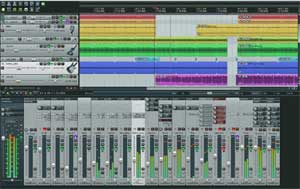
Reaper comes with over 200 effect plugins. It’s capability is vast and it’s programming is light, meaning it loads fast, has an installer that is only a couple of MBs and is portable on a USB drive! Updates come fast and often. There is Mac and Windows version, a 64-bit and 32-bit version. And the pricing model is unheard of. There is only one single version of Reaper, from the 30-day trial (that won’t stop working after 30 days if you need longer to evaluate!), to the “discount license” price of $60 to the “commercial license” of $225. It’s all the same. And who decides if you get the discount or the commercial license? You do! It’s an honor system. Their guideline (you can read all about this here: http://www.cockos.com/reaper/purchase.php) is that if you make $20,000 US dollars a year using Reaper, you should pay for the commercial license. Unbelievable. Plus the user community is like no other with an amazingly active forum. Can you tell I’m a fan?
However, like I said earlier, both programs offer a lot of audio recording capability for an incredible price.
To learn more about Mixcraft 6, click here.
 Our mission at Home Brew Audio is to provide you with resources (tutorials, articles, gear reviews, tips and techniques, etc.) to help you achieve your goals and dreams. For some, that will be recording their music so they they can release their own songs or CDs, record demos and auditions, etc. For others, it might be to start a voice-over career – getting paid to be the voice behind radio or TV ads, e-Learning videos, audio books, documentaries, video games, etc. And for some it might mean putting out more professional sounding podcasts, YouTube videos, webinars, sales videos, etc.