The online version of a music technology magazine reviews a new program, Disintegrate, put out by the ModeAudio company. The magazine gives this program a 9 out of 10 rating. The reviewer is pleased with the fact that the program has a large – 630Mb – amount of repeating sections of sound. The reviewer likes the diversity of sound files that are available with this program. Examples are recordings of drum and bass playing. The reviewer summarizes the good features with several bullets at the end of the article.
Read more: Disintegrate Cinematic Ambient Loops Reviewed – Epic World-Building Sounds
 Why sound editing software can be your friend. One common problem with recording the human voice is sssssomething called ssssssibilance. If you didn’t already know what “sibilance” meant, my odd spelling above may have clued you in. It’s a sharp, biting hissing sound that happens whenever the recorded voice utters the “S” sound. You’ll be listening to the recording, and everything will sound great, until the speaker/singer utters the phrase “she’s a sensation,” and pierces your eardrums.
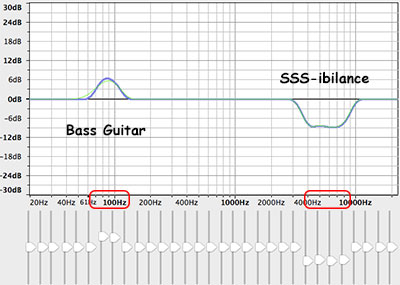 If we know, for example, that the “bass-y, boom- y parts of a bass guitar will most often be found around 80-100 Hz. So we can then we use an EQ to turn down (or up….but usually down….never mind) the bass by ONLY turning the volume down around 80-100 Hz. Likewise, high sounds like the sizzle of a high-hat, can be found hanging out around 6,000 Hz (or 6KHz for short). So if you knew that vocal sibilance mostly hung out between 4 KHz and 10 KHz, you would know where to start looking for your particular brand of hissiness so you could fix it.
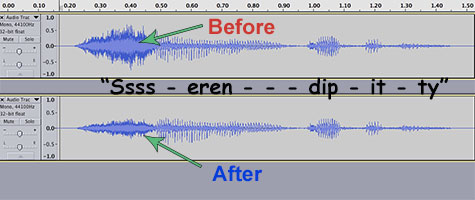 It’s so cool that we can use our eyes to edit audio now. Isn’t it? Sigh, OK I’m a geek. Anyway, you can usually see sibilance on a computer screen pretty easily, using any sound editing software available. The squiggly blobs get all bunched up and dark for a bit. In the picture, you can see the word “serendipity’ recorded. The blue blob at the beginning.