What is an AD converter? Well, “AD” means “analog-to-digital.”So an AD Converter is basically a translator for audio. It takes audio from one end and changes it to something a computer can understand, spitting that out the other end.
The result of analog-to-digital conversion is actually more common than you might realize. Analog-to-digital converters go by quite a few names, including A-D converters, ADC, and A/D converters.
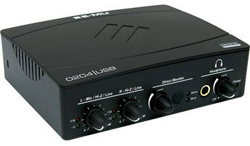
The reverse is also available, being a D-A converter, or DAC. D-A converters might be part of an interface box, such as with the EMU 0404 in the picture on the left) or a separate component.
I’ll discuss their function shortly. As we’ve discussed recently (see the post 16-Bit Audio Recording – What The Heck Does It Mean?), analog is the physical, continuous signal that our bodies can make and understand (hear). Digital signals are the only thing computers can understand, so converting between the two signals is necessary for any modern recording project.
So What Is It?
There is no way for a computer to store an analog signal without it being first converted to a digital signal. Even though you may not have anything that you know as an ADC, it may be an internal component to other items. Even a cheap $5 PC mic has an ADC inside of it! Different qualities of converters make the conversion in different resolutions. The resolution of a converter is the same as the bit depth of the recording it produces.
Think of this “resolution” as the vocabulary that the converter can use to describe the analog information to the computer. An 8 bit recording only knows 256 words, while a 16 bit recording knows 65,536 words.
If that seems like a great improvement, how about 24 bit recordings which use over 16 million words? There’s not actually some robot inside each ADC writing wordy reviews of your recordings for the computer, but the reality isn’t too far off. With higher bit depth and resolution, the digital recording will be much cleaner. You might not notice a huge difference between 16 and 24 bit recordings, but you will certainly be able to hear the difference between 8 and 16 bit.
Some A-D converters will also make the reverse conversion via the audio-out plug. Remember that humans can only understand analog signals, so it’s necessary to convert from the digital information on the computer and turn it into an analog signal for the speakers to turn into audible sound.
How Do I Convert My Audio?
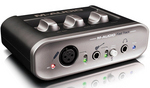
The internal A-D converter that comes with some products is usually of moderate quality. The quality of your recordings will not be higher than your lowest quality piece of equipment, so an upgrade to a separate interface box will eventually be necessary.
There are plenty of options on different converters, so getting the right one for your home recording needs might not be as simple as it sounds. You might be surprised at how many different options there are.
You can start to get decent converters in audio interface boxes starting around $100 these days (not so only as recently as 5 years ago), but as with most things used in recording there are also cheaper versions and much more expensive versions available. The EMU 0404 (which is an interface that happens to contain excellent AD converters) I mentioned at the beginning of the article runs about $130. Something like the M-Audio/Avid Fast Track also has decent converters inside but only runs about $110 dollars.
Then at the very high end you have dedicated A-D/D-A converters like the Apogee Ensemble 8-Channel Converter, which you can have for a mere $1,729.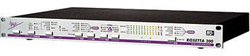
So go convert some sound into ones and zeros and make some awesome audio.
Cheers!
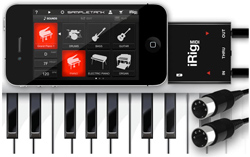
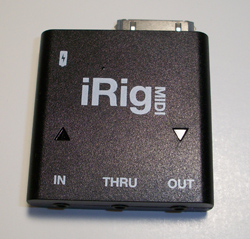 The main hardware is called ultra-compact on the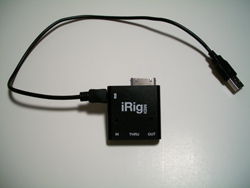
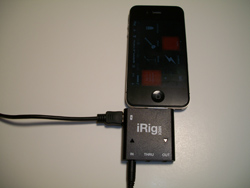 way my power cable. No problem I thought, I’ll simply plug the iRig MIDI cable into the Korg’s MIDI OUT jack and we’ll be in business. Not so. The iRig MIDI has a triangular light above both the MIDI IN and MIDI OUT ports to indicate when data is being went or received. With my Korg connected to the iRIG MIDI IN port, the light above that port should have been blinking red. I even went and got the the power cable for my Korg and hooked it up. Still no blinking red light. Next, I moved the switch on the back of the Korg. Still nothing. It wasn’t until I physically disconnected the USB cable on my Korg keyboard that the light started to blink. It would have been helpful to know this in advance, though it is not unreasonable for IK Multimedia not to have specs on every conceivable MIDI keyboard out there.
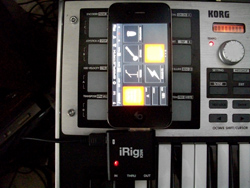 eTankFree app). Well, yours truly did figure this out for about an hour. I couldn’t figure out why I couldn’t play the sounds with my Korg keyboard, especially since I could hear the sounds using the Play button in the Sounds screen. After much confused frustration I noticed that the sounds I didn’t technically own were grayed out. Normally when something is grayed out on a computer screen, it means it cannot be selected or used in any way, which as I mentioned, was not the case with the SampleTank app. The grayed-out instrument sounds could both be selected AND heard if only to audition. Hence my confusion. When I finally selected one of the FREE sounds, voila! I was able to play the sounds with my Korg keyboard.