I have mentioned in the past – see our post Recording Engineer, Mix Engineer and Mastering Engineer – Oh My – that there are really 3 distinct jobs when recording, especially for music:
- Recording (sometimes called “tracking”)
- Mixing
- Mastering
When we record from our home studios, we often do all three things, but there is a lot of benefit to drawing at least a mental line between all 3 jobs. It helps us to refocus and think a bit differently about what we’re doing.
But if you are going to send your music project to a mastering engineer – which is a really good idea, BTW – then there are some things you can do not only to make life easier for the mastering folks, but to get your project produced faster and sounding better.
In this article, Bobby Owsisnksi outlines 8 tips for making your mixes more master-friendly. I would add one tip to the list though, and that would be to leave some headroom in the final mix-down (rendered stereo file of the mix). This gives the mastering engineer room to work with and optimize the final level of the song. If you send in a compressed and normalized audio file, the mastering engineer doesn’t really have breathing room to allow space and “air” to come through in the final version.
But without further ado, here is the original article to which I refer:
http://www.prosoundweb.com/article/in_the_studio_eight_tips_for_mixing_for_mastering/
 If I had to estimate what percentage of very professional-looking sales videos on the web were accompanied by crappy audio due to poor voice-over quality, I’d have to say at least 50 percent. That’s a lot folks! And there is no reason for it – none at all. Audio for video is not hard. If your videos are just for fun, the narration quality may not be that important. But videos for your business affect the bottom line, and amateur-sounding audio might well be limiting how successful you are.

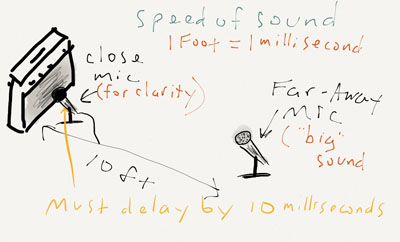 So now you have 2 microphones recording a single sound, the electric guitar. But one of the 2 mics is 10 or 15 feet further away, and the sound will reach them at different times. Blending the sound from both mics will reduce or eliminate the clarity and attack of the guitar that we need because of the delay of the sound going into the far-away mic. But armed with our new-found knowledge about the speed of sound, we can compensate for the delay by simply adding some delay to the close mic. In the studio you can use a delay effect in your recording software/DAW (such as