 There are several ways you can create a stereo effect when recording a voice, like a lead vocal in a song or as an effect in a voice over production. But first, let’s talk about why you might want to do this.
A clean and clear solo voice is the most natural and usually the best way to produce a vocal track. But there are times when you might want to add spaciousness or thicken up the sound of a voice. This effect is used a lot in music recording, often to create an intensity at certain points (like before the chorus) in a song, or even as the primary sound of a particular singer or band. Jon Anderson, from the group Yes, is an example of the latter.
I’ve been listening to The Beatles a lot lately and it seems a huge majority of their songs have the lead vocal coming at you in some sort of stereo, or at least doubled way. By “stereo,” I mean that the part (whether that be a voice or anything else) is actually two versions of itself and sounds as if it is coming at you from various directions as it does in real life. In the case of The Beatles, most of their recordings were produced in mono, so technically the vocal doubling wasn’t stereo. But the techniques they used to get thicker and spacey voices do produce a stereo effect if each of the signals is panned so that one comes from the left channel and the other from the right. In fact, that is exactly what happened when Beatles songs were remixed for stereo versions.
So what are these 3 tips for recording a stereo vocal?
Use 2 Mics When Recording
Of course the most obvious way to present a sound in stereo is to record it that way. Use two microphones to record one voice. This could be done using a stereo microphone (which is really two microphones in one), or two separate mics. Then in order to create the stereo effect, the output of each mic must go to its own track when recorded they can be panned left and right. If they stay together in the center of the mix (not panned at all) the result is a thicker (for lack of a better word) sounding voice like in the Beatles’ mono recordings. This is an effect all its own, called doubling, that is very common these days, but not technically stereo.
Anyway, using two mics for a stereo effect requires one more thing, which is to create a difference between the two recorded signals. This is because two identical signals, even if panned left and right, will still sound like only one un-panned signal coming from in front of you. In real life we take in audio through our ears (yeah, I know – alert the media), which as you have probably noticed, are on opposite sides of our head. Also in real life, sound comes to our ears only after it has bounced off of walls, floors, ceilings, and other surfaces. Each ear receives a slightly different version of the sound, allowing us to determine which direction the sound came from.
So in order to provide our listeners with a slightly different version of the voice for each ear, we have to make sure each mic points at the signal at a different angle. In a stereo mic, each of the two mic capsules point (usually) across the singer’s mouth instead of at it, almost as if the mics were aimed at imaginary people to the left and right of the singer. These two different angles provide the differences we need.
You can do the same thing with two separate mics if you make sure to put them really close together. But another way is simply to separate the mics by a few feet, and then unlike the previous method, point each mic directly at the singer’s mouth. Again, each mic will pick up the voice with different directional information and allow for a stereo sound when panned in the mix.
Sing Twice
The second way is to record the singer singing the part onto one track with one mic, and then record the singer again, singing it a second time (typically using the same mic) and recording this version onto a different track from the first. The differences in performance (subtle timing, breathing, phrasing, differences, etc.) will be more than sufficient for a stereo effect when panned in the mix. The Beatles used this method a lot in the early years prior to 1966.
One drawback of this method is that it sometimes singers don’t like it. John Lennon was particularly critical of doing things this way. He disliked it so much that EMI engineer Ken Townsend invented a way to create a similar effect without requiring the singer to sing twice. This technique came to be known as automatic double-tracking and common in modern recording. Essentially this technique electronically creates a second copy of the voice (or whatever is being recorded) and introduces changes to it that provide the required difference for the stereo effect. And that brings us to the third tip.
Copy The Voice
You can create stereo even if you only have one recorded performance. In today’s computer recording world it is simply a matter of copying and pasting like in a word processor. In Reaper, for example, you can click and drag an audio item while holding down the “ctrl” key and instantly create a copy in a second track. But that isn’t enough is it? Remember that you need to make them different from each other somehow, and then you need to pan them left and right to get stereo. Two copies of the same thing, regardless of how you pan them, is really just the same thing, only louder.
Perhaps the most common way to create the difference we need is to time-shift one of the versions by a slight amount. In most recording programs, simply dragging the audio item left or right in its track will shift it in time. Obviously if you move one of the tracks too much, it will be less stereo, and more of an echo. We’re only looking for a time difference 25 t0 35 milliseconds. It is a fascinating trait of human audio perception that we can hear two things separated in time by that amount and not consciously detect that we are hearing two things. But that small time difference is enough for our unconscious minds to hear a stereo effect if the two tracks are panned left and right.
Besides time-shifting other differences can be introduced, such as timber and tonal alterations to further increase the intensity of the effect. This is taking advantage of something called “The Haas Effect,” which you can read about in our article What Is The Haas Effect?
Use any or a combination of these three techniques for creating a cool stereo effect for a voice – or anything you’re recording for that matter.

 There is a term in audio recording that is a bit confusing (go figure) to a lot of folks who are not immersed in in the audio or electronics world. Oh, who am I kidding? There are scads of those terms. That is part of the why Home Brew Audio exists – to translate the techno-lingo into the common speech:). But the term I refer to today is “bus”, also sometimes spelled “buss” or mixer bus, though that just confuses the issue even more. But I digress (Really? Me? but that never happens;)).
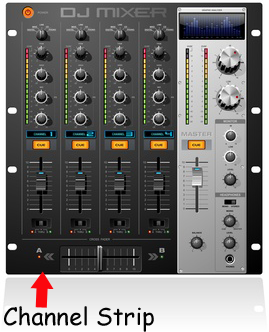 Anyway, the term, as so many are, is a left-over from the analog days when physical mixers were necessary in audio recording (hint: they are no longer necessary in computer recording). A buss is an output channel on a mixer that has collected all the audio from any channel that is sent to it. For example, If you have a 16-channel mixer, there will be a channel strip for each of those 16 channels. The “master” channel is actually a buss, because it takes the output of all the channels on the mixer and outputs them to your speakers or headphones, etc. All channel strips on mixers are usually sent there by default. But you can also choose other busses to send these channels to. For example, there is usually an auxiliary (often abbreviated as just “aux”) buss knob on each channel strip which lets you send the audio on that channel to the (you guessed it) the auxiliary buss on the mixer. Then the aux buss will output all channels sent to it, and only those channels.
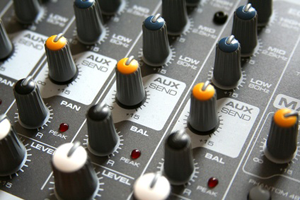 There are other types of busses and even other names for the ones I described. For example, sometimes the aux buss is called the effects buss. But at the end of the day, the only thing you need to know is that a buss combines signals from several other places on a mixing board. We use the same concept on non-physical computer mixers nowadays, which are almost always designed to mirror the way a physical mixer works, though we have a lot more flexibility to create our own virtual busses to create groups, submixes, and any combination of inputs and outputs.
 Sound fail at Academy Awards (2012) – I don’t know if I am just over sensitive to it but I could barely stand to watch the Oscars last night due to the terrible audio. The ringing feedback from the PA system was constant. Plus, from the very start the mix was poor between vocal and orchestra. I could barely hear Billy Crystal’s lyrics over the music, and the announcements about a winner as they walked up to the music were also barely audible.