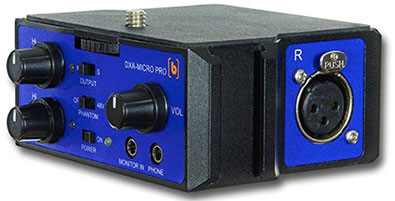
The BeachTek DXA camcorder adapter solves a slew of problems for camcorder owners wanting to get decent audio on their videos. It makes it easy to attach professional microphones and other audio sources to your camcorder.
Getting good sounding audio on a video camera, especially a camcorder, is very difficult. First, you either need to get a camcorder that has an external microphone input. That in itself is surprisingly difficult. But even if your camera does have an external mic input, it is almost certain to be a teensy weensy little 1/8th inch stereo “mini” plug. And if you have a standard microphone you want to hook to your camera, it will have a fairly large 3-pin cable, called an XLR cable.
In order to hook an XLR mic to a camcorder (remember XLR is the standard microphone connector), you need some kind of adapter. In most cases you’ll need two adapters, one to turn the XLR into a 1/4-inch plug, and a second one to turn the 1/4-inch plug into a 1/8-inch plug. At that point you can plug the mic into your camcorder, but it is very dicey because you have a heavy cable plug made even heavier with two adapters, hanging off of a small and fragile 1/8-inch pin.
To make matters even more difficult, your camcorder’s stereo mic plug will record all your audio onto only the left channel, so when it plays back it will sound lopsided, like it is coming only from the left side (unless you record with a stereo microphone, which few folks not in the “biz” will be doing). This requires you to edit the audio on your computer to make sure it gets distributed to both left and right channels. What a huge pain!
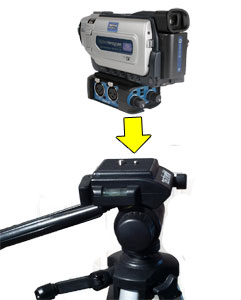 But with this cool product, you mount your camcorder on top of the BeachTek DXA-2T adapter via the tripod connector mounting screw. You’ll need a coin (or a guitar pic, which is what I used) to tighten it from the bottom of the DXA, where there is also the female tripod connector allowing you to mount the whole thing to a tripod.
How It Works
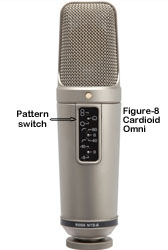
Let’s say you’re doing a talking-head type of video. Without an external mic connector on your camera, your sorta forced to use the built-in camera mic, which is small and of pretty poor quality. But the biggest problem is that the mic will be too far from the mouth of the person talking. This will cause the audio to be echo-y and noisy. If you do have an external mic hook-up, you can now set up a decent microphone (a dynamic mic like the Shure SM58 or Electro-Voice RE16; or a large diaphragm condenser mic like the Audio-Technica AT 2035 or the Rode NT2-A) in front of the person’s mouth to get good quality audio. Just attach the BeachTek to your camera and you’re ready to plug the microphone straight in with no adapters, and record awesome audio along with your video.
The BeachTek has two XLR inputs, each with a switch to select Mic or Line input. You’d use the line input for an instrument or a mixer feed, for example. In addition to the two XLR inputs there is Aux (auxiliary) mini-plug input that is ideal for wireless receivers. Each XLR input also has Trim control knobs which allow you to control the input levels, essentially turning the DXA into a little mixer if you’re using two mics. Oh yeah, I didn’t mention that having the two XLR inputs allows you to use two mics simultaneously. You can either mic two different people or use 2 mics for stereo recording. There’s a switch on the DXA that allows you to choose mono or stereo.
How is It Powered?
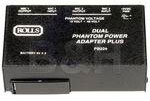
Another of the features of this little box is that it requires no batteries or other power of any kind. This simplifies things and helps keep the unit light-weight. It does bring up a bit of an issue, though, for using condenser microphones, which I always recommend doing if you are recording inside. But condenser microphones (see our article: What Are The Different Types of Microphones? for a review of this) require power in order to work. So how do you use a condenser mic with the BeachTek? If you are using a shotgun mic, these frequently can operate on batteries. One good example is the Audio-Technica AT8015. Several other condenser microphones use batteries as well. I used a Shure Beta Green 5 (unfortunately discontinued) for one of the video demos below. Another AA-battery powered handheld mic is the Nady SPC-25. If none of yours can work with batteries, you can either run it through a portable phantom power box like a Rolls PB224, which operates from 9v batteries, or you can simply take the output of your recording interface or mixer and run that into the DXA.
Results
Here are 4 videos. The first one used no external microphone at all.
The second video used a battery-powered handheld condenser mic plugged into the BeachTek DXA.
The third video used a Shure SM58 dynamic mic (no power required).
The forth video used a large diaphragm condenser, the Rode NT2-A.
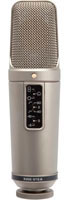
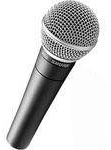
Setting everything up was easy and fast. It took me exactly 2 minutes to attach the device to my camera and then the whole enchilada to the tripod. I had read the instructions (taking a major hit on my man-card to do so:)), which are short but important. Then I recorded four short videos. The fact that I can hook my primary studio mic, the Rode, to my camera is just awesome!
To sum up, I’d say the BeachTek DXA-2T is a must-have device for folks with camcorders who have been wanting to hook up their “good” mics to their camera. It is also excellent if you want to connect two mics or take the output of a mixer if you’re recording a live performance or concert. If you already have a decent wireless lavalier or a shotgun mic, which have mini-plug connectors, the DXA may not be as immediately useful, though it still gives you more options if you ever need them. The DXA goes for $179.00.
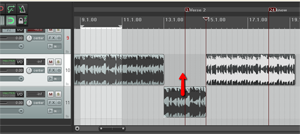 Whether you are recording your own music or working with a music file that already exists (usually a royalty free music clip for background music), there are many times when it is useful to cut, copy, and maybe paste sections of a song. Here are just a few of the more common reasons for needing to do that, just off the top of my head:
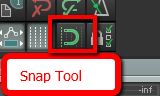 When working with music files, it is important that any edits you make do not mess with the timing. Otherwise it will be jarring to the listener. If you want to slice up a song, say, to make it fit a video, you want it to sound seamless in terms of the beat of the song. One excellent tool for doing this is the snap tool. This is a pretty common tool for editing both audio and video. In the picture on the left is where to find the tool in Reaper.
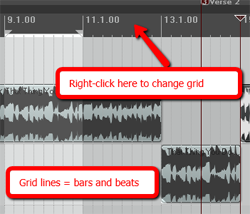 The idea of snapping is simple enough. It is a way to ensure the edges of an item can only be be moved and placed so that they align with a grid. In the case of audio, that grid is frequently bars and beats, though you can change the grid to be other things, like minutes and seconds, etc. For our purposes in this article, we want to make sure we use bars and beats. In Reaper (see picture on the left), simply right-mouse click in the band across the top of the screen to change the grid settings.
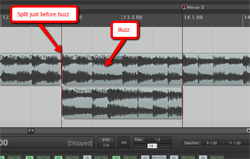 ake sure you line it up just right. Again, the snap tool needs to be ON at this point.
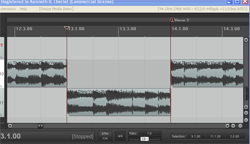 5. Now drag the left edge of the section with the guitar buzz in it to the right, creating a blank space where you will insert the part you are pasting. Things should now look like the picture to the left.
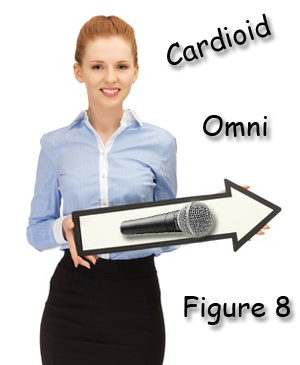 Do yo have a directional microphone or an omnidirectional microphone? Are you even certain? The directionality of a microphone, that is, whether it picks up audio best from the front only, or from all around it (or some other pattern of pick-up) is frequently called the polar pattern of a mic. To get the best sound from a microphone, it’s important to understand the different polar patterns and how to use them properly. Polar patterns are also sometimes known as pick-up patterns, because their function is to ‘pick up’ the sound. There are three main polar patterns and each serves a different purpose.
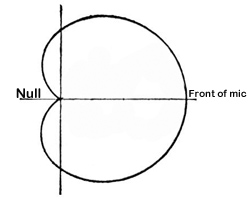 This is among the most common polar patterns that you will encounter. Meaning ‘heart-shaped’, this type of pattern will give you a good pickup to the front, with a lesser amount to the sides, and a good sound rejection to the back. Cardioids are also known as “directional” mics since they only pick up audio from one direction.
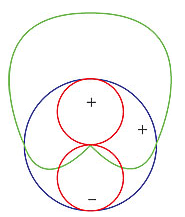 Cardioid polar patterns are recommended for most vocal applications, recordings and live recordings. It is suitable for venues where the recording environment’s acoustics are good, but less than perfect. This is because a cardioid rejects audio from behind it, so if you have reflections or other potentially unpleasant audio coming from behind the mic, its effect will be minimal. Sometimes the area behind a cardioid mic is called the “null” because it is sort of an audio no-mans-land. See picture on the right.
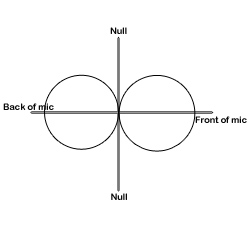 Also known as bidirectional, this polar pattern microphone will pick up sound equally from both sides of the microphone. This also means that the nulls for a figure-8 pattern are on either side, as indicated in the picture on the left.